Monitor and download your Monthly Policy Review evidence for your funder
If you have a policy site with The Policy Place, you'll be accessing monthly Policy Review practices on top of your StartSmart induction. Here's how to monitor your teams progress and pull the per-review evidence PDF for each monthly review.
3 min read
As a Policy Place partner, your team gets a monthly Policy Review — short practice quizzes (and sometimes coaching scenarios) that keep everyone current when your policies are updated. Each monthly practice comes with its own summary of your teams progress and per-review evidence PDF you can download whenever you need it.
This guide walks you through monitoring progress and pulling that evidence and shows how it fits alongside your Team Report.
When to use Policy Review evidence
- Monthly filing — download the PDF at the end of each review cycle and drop it in your quality management folder
- Audit prep — attach the last 12 months of Policy Review evidence to your annual funder or accreditation report to show how your people are keeping up to date with your policy changes, not just baseline induction
- Post-legislation change — when a specific policy update matters to a funder review, you've got a dated record that your team practised the monthly review covering that update
Step 1 — Open the Team dashboard
Click Team in the header.

Step 2 — Scroll to the Policy Reviews section
It sits below the staff table and Team Capability Insights, near the bottom of the page.

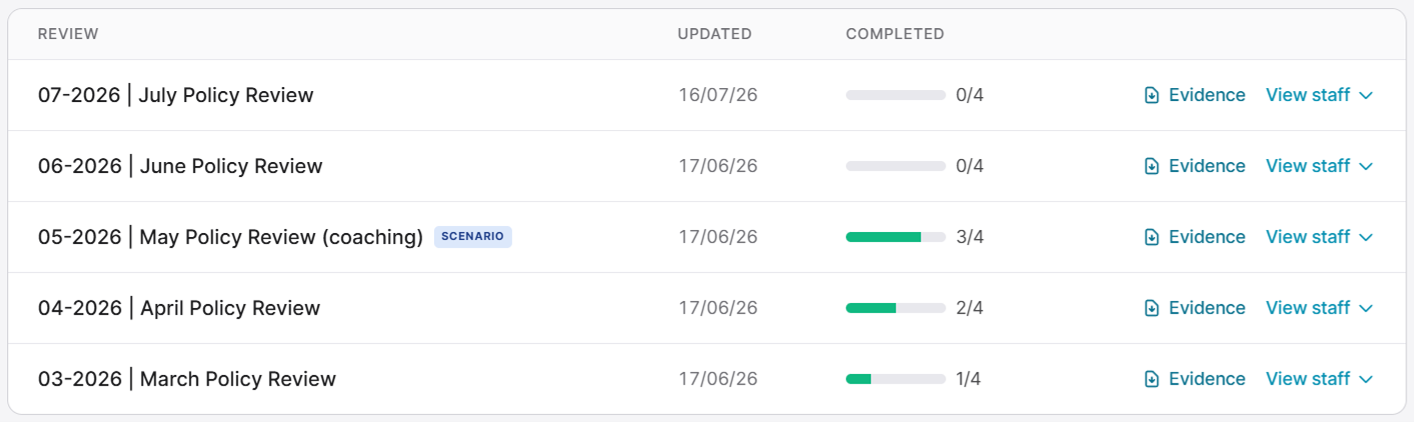
Each row shows one monthly review, sorted with the most recent at the top. You'll see the review name (e.g. "07-2026 | July Policy Review"), when it was last updated, and a completion progress bar for your team.
Step 3 — Monitor your teams progress
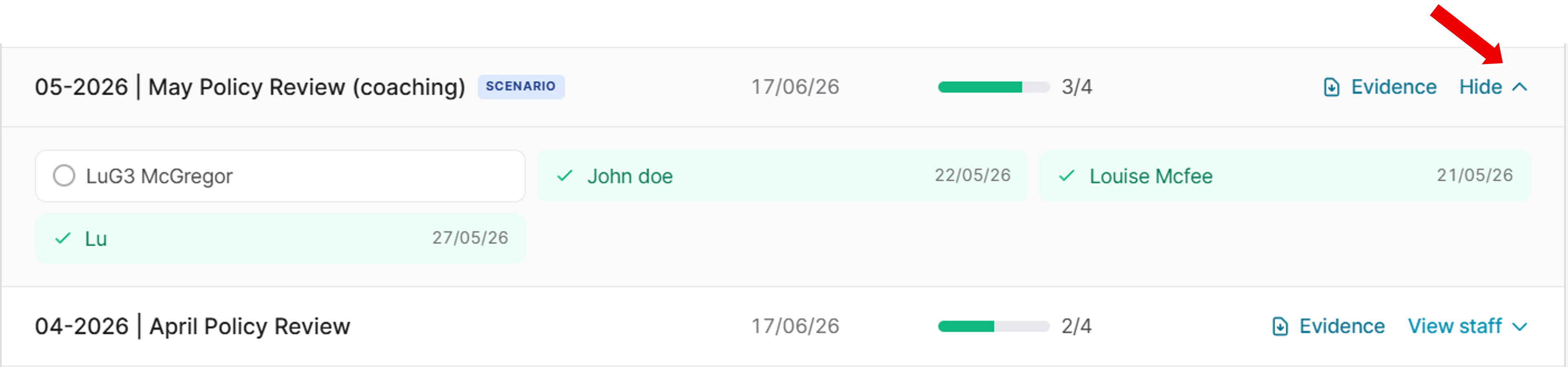
Click View staff on a review row to expand it in place. You'll see each team member and their completion status without needing to download the PDF. Useful for a quick "is anyone lagging?" scan.
Step 4 — Download the Evidence PDF
Click Evidence on the review row you want. The PDF generates and downloads with a filename like `policy-review-evidence-july-policy-review-2026-07-18.pdf`.

What's in the Evidence PDF
Each PDF is a single-review deep-dive. It shows:
- The review name and when it was last updated — so you can show which monthly review, and which update of it, your team practised
- When the PDF was generated — audit-friendly timestamp
- Summary boxes — how many staff completed, in progress, not started
- Every active team member with their name, role, completion status, date completed, and score (or scenario walk label for coaching scenarios)
- Historical members too — anyone who was on your team during the review's active period gets included with their joined/removed dates. This closes the "did they leave before or after they practised this?" question auditors sometimes ask
How it fits alongside the Team Report
Two documents, providing two different sets of evidence:
1. Team Report provides evidence of "What has our team completed of the induction and assignments we required?" The Team Report rolls-up the information across your team into a single PDF
2. Policy Review Evidence provides evidence of "Did our team practise the specific policy update we released in month X?" The document provides a single PDF per-review showing team completion evidence.
For most funder reviews, both belong in the audit pack. The Team Report gives the overall picture; the Policy Review PDFs give the granular "yes, we responded to that specific policy change" evidence trail.
After you download
- Monthly cadence: file each PDF as it comes in — end-of-month, straight into your compliance folder, named by review
- Annual audit: bundle the last 12 months' evidence PDFs into your audit pack alongside the Team Report
- Send upstream if your umbrella HQ wants network-wide reporting
Common gotchas
"I don't see a Policy Reviews section at all." Policy Reviews are only available to Policy Place platform partners. If you're on a standalone Pro or Free subscription and you don't have a Policy Site with The Policy Place, this section won't appear. Get in touch at hello@policy-place.com if you'd like to know more about how we can support your policy management and reviews.
"A staff member is missing from the Evidence PDF." The PDF includes anyone who was an active team member during that review's active period. If someone was added AFTER the review released, they may not be included in that specific PDF — but they will be in the next month's.
"The PDF shows staff I've since removed." By design — removed staff who WERE active during the review's period stay in the PDF for continuity. Their removed date is shown so an auditor can see they were on the team at the relevant time.
"I need one PDF covering all reviews for the year." Not currently available — each review has its own PDF.